The screenshot ritual
I was training for a marathon and had settled into a routine. Finish a run, open Gadgetbridge (an open-source app I use in place of the watch maker’s own app), take three or four screenshots of pace, heart rate and splits, paste them into Claude, ask “how did that go?”.
It worked, more or less. But two things kept bugging me.
First, it was tedious. Every run meant a handful of screenshots and an LLM squinting at pixels to read numbers that were sitting in a database a few taps away.
Second, and more important, the answers were missing context. A run doesn’t happen in isolation. How I slept, how stressed the day was, my resting heart rate over the last week: all of these shape how a run goes. The watch was recording all of it, all day, every day. None of it was making it into the conversation. I was asking a coach about my run while hiding everything else from them.
Here’s the same half marathon, asked about both ways:
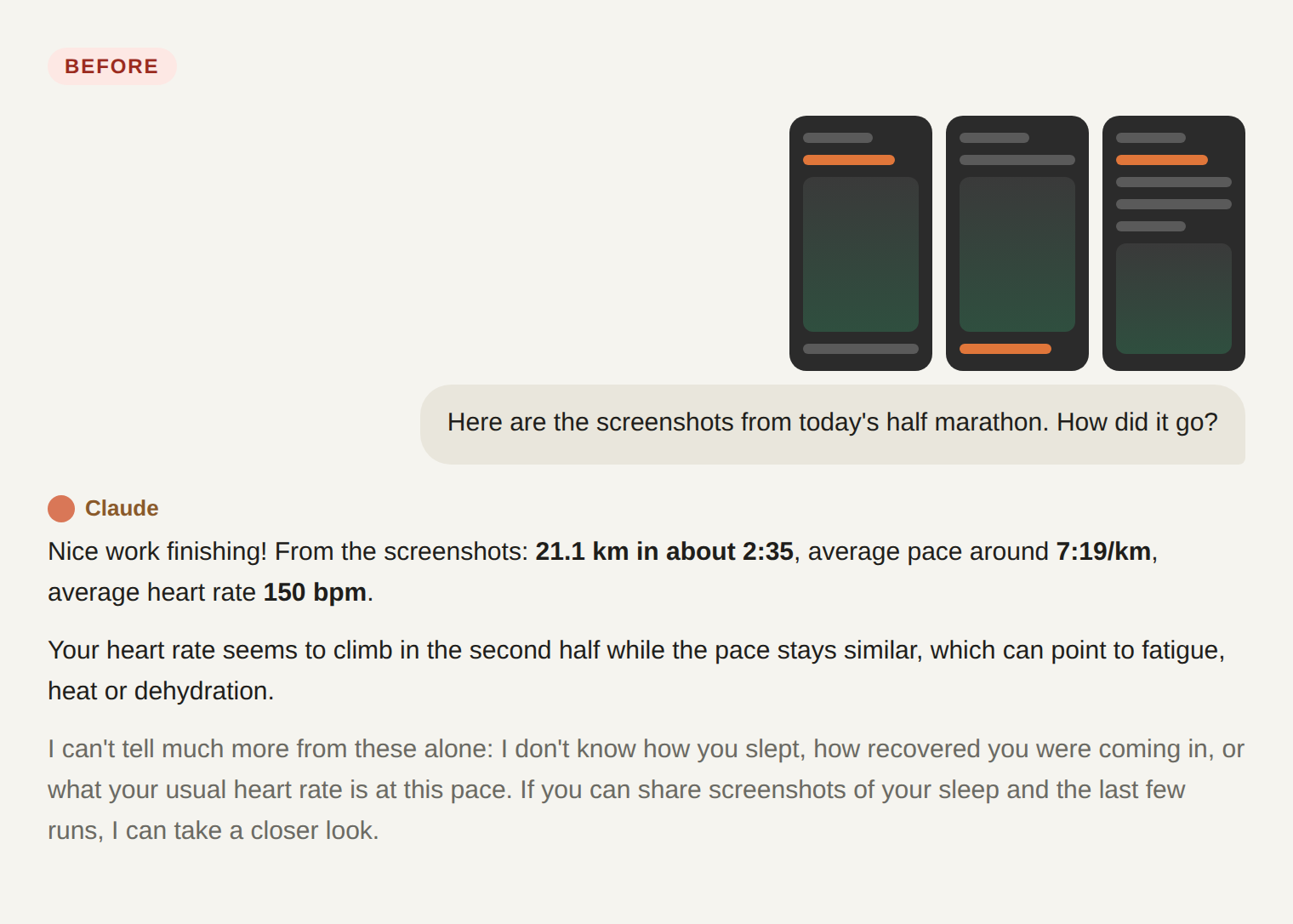
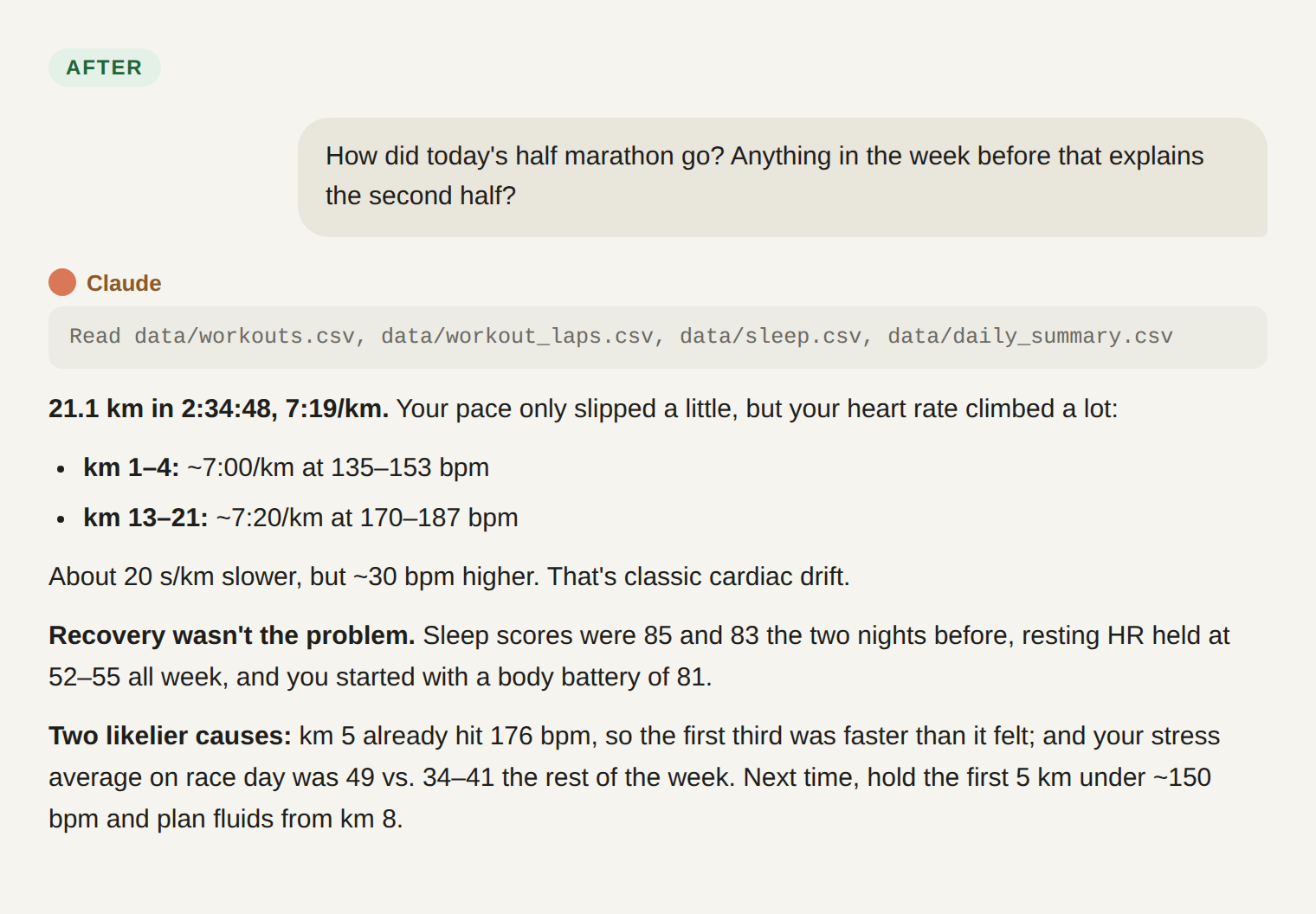
The chat screenshots in this post were recreated with AI, so none of my actual chats or personal details end up on the internet. I’m a little paranoid about privacy. 🙈
The second answer is the one I wanted all along. The rest of this post is how I got from the first to the second.
So the problem became: how do I get all of my watch data in front of an LLM, without turning it into a chore?
What “good” looked like
Before looking at options, I wrote down what I actually wanted. This list did most of the work later, because almost every option failed one of these:
- All the data, not just workouts. Sleep, stress, resting heart rate, daily heart rate, body battery.
- As few intermediaries as possible. This is health data. Part of the reason I use Gadgetbridge is to keep it off the watch maker’s servers. I didn’t want to undo that by shipping it somewhere else.
- Automatic. Some one-time setup is fine. A manual step after every run is not; that’s just the screenshot ritual in a different outfit.
- Available anywhere. If I’m out after a long run with only my phone, I should still be able to ask questions about it.
Option 1: the Strava MCP
The obvious answer. Strava has an official MCP connector that plugs straight into Claude. (MCP is just a standard way to hand an LLM a tool, in this case “read my Strava”.)
It failed three of the four checks:
- It only knows about activities. Strava is built around workouts. My sleep, stress and resting heart rate don’t live there, so the most interesting context was missing by design.
- It’s another intermediary. I’d have to upload my data to Strava first, which is exactly what I was trying to avoid. And Strava’s relationship with third parties hasn’t exactly been stable; in 2024 they rewrote their API terms, including a ban on third parties feeding Strava data into AI models, which broke a fair few apps. Not something I want to build on.
- It’s subscribers only. Paying a monthly fee to read my own data back felt backwards.
Option 2: plug the watch into the laptop
The data lives on the phone, so the next idea was to get it onto my laptop (export it, copy it over, sync it somehow) and point an LLM at it there.
This one I dropped quickly. It brings back a manual step every time, and it ties the whole thing to the laptop. The moment I care most about the analysis is right after a run, when I’m standing outside sweating, not sitting at a desk. Fails checks 3 and 4.
Option 3: Termux plus a cloud bucket
Termux gives you a proper Linux command line on Android. The plan: a small scheduled script on the phone that picks up Gadgetbridge’s export and uploads it to a storage bucket on Cloudflare, AWS or Google Cloud. Then whatever LLM I’m using reads from the bucket.
On paper this ticks every box. In practice:
- It didn’t run cleanly on a recent Android. Since Android 12, the system kills background processes it considers stray, and Termux is a well-known casualty. There are workarounds (developer settings, ADB commands), but a pipeline that only works after fiddling with system internals is a pipeline that will quietly stop one day.
- It was getting complicated. A bucket means an account, credentials on the phone, access rules, and then still a way for the LLM to read from it. Each piece is simple. Together they’re a small project I’d have to babysit, for a problem that should be boring.
That second point was the real lesson. The goal was simple enough that I forget it exists, not just technically possible.
The pivot: Git is already a sync engine
Looking at what the bucket was supposed to give me: storage, access from anywhere, access control, and something LLM tools can read. A private GitHub repository already does all of that, and it brings a full history of every change for free.
More importantly, the LLM tools already speak Git. Claude Code, Codex and others connect to a GitHub repo as a first-class thing. No glue code needed on that end.
So the question shrank to: how do I get a file from my phone into a Git repo, on a schedule, without me? It turns out that’s a solved problem.
The setup
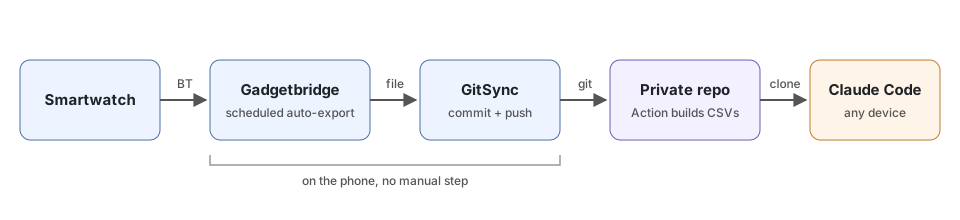
Five pieces, each doing one thing:
- Gadgetbridge already talks to the watch over Bluetooth and keeps everything in a local SQLite database (a single-file database). It has a built-in auto export that copies that database to a folder of your choice every few hours, plus an option to drop a
.fitfile (the standard workout file format) for every new activity. - GitSync is a small open-source Android app that keeps a folder in sync with a Git repo in the background. Point it at the export folder, give it a schedule, done.
- A private GitHub repo receives the pushes and keeps every version. It’s the one place everything else connects to.
- A GitHub Action runs on every push and turns the raw database into a handful of readable CSVs: a daily summary, sleep per night, stress per day, workouts, per-kilometre splits. It also fixes the watch’s elevation numbers (more on that below). LLMs are much happier reading a CSV than poking around a database with 170 tables, most of them empty.
- Claude Code opens the repo from my phone or laptop and can actually run things against the data. The CSVs answer most everyday questions; when they don’t, it queries the database directly or opens a single run’s
.fitfile for per-second detail.
The Action is the quiet hero here: the phone only has to drop a file, and all the cleanup happens for free on GitHub’s machines, with no server of my own to run.
The one-time setup was an evening. Since then I haven’t touched it. I go for a run, the watch syncs to the phone, and a little later the data is in the repo without me lifting a finger.
One file that turned out to matter a lot
The first few conversations had the LLM rediscovering the same traps every time. For instance, step counts in the database are a running total for the day, not steps per minute. Add them up naively and you get millions of steps a day. Timestamps are in UTC, and some tables are in seconds while others are in milliseconds.
So the repo has a CLAUDE.md file, which Claude Code reads automatically at the start of every session. It describes where each kind of data lives and lists every gotcha we’ve hit, with the fix. Every time something gets figured out the hard way, it goes in there. It’s effectively the memory of the project, and it’s the difference between an LLM that’s guessing and one that knows the data.
The payoff: better questions
The whole point was richer context, and it delivered. Now I can ask things like:
- “My long run felt terrible today. Anything in the last three nights of sleep or stress that explains it?”
- “How has my resting heart rate moved across this training block?”
- “Compare today’s heart rate at marathon pace with the same pace a month ago.”
My favourite moment though was one I wouldn’t have got with screenshots. My watch kept reporting absurd climbs on flat routes, so I asked:
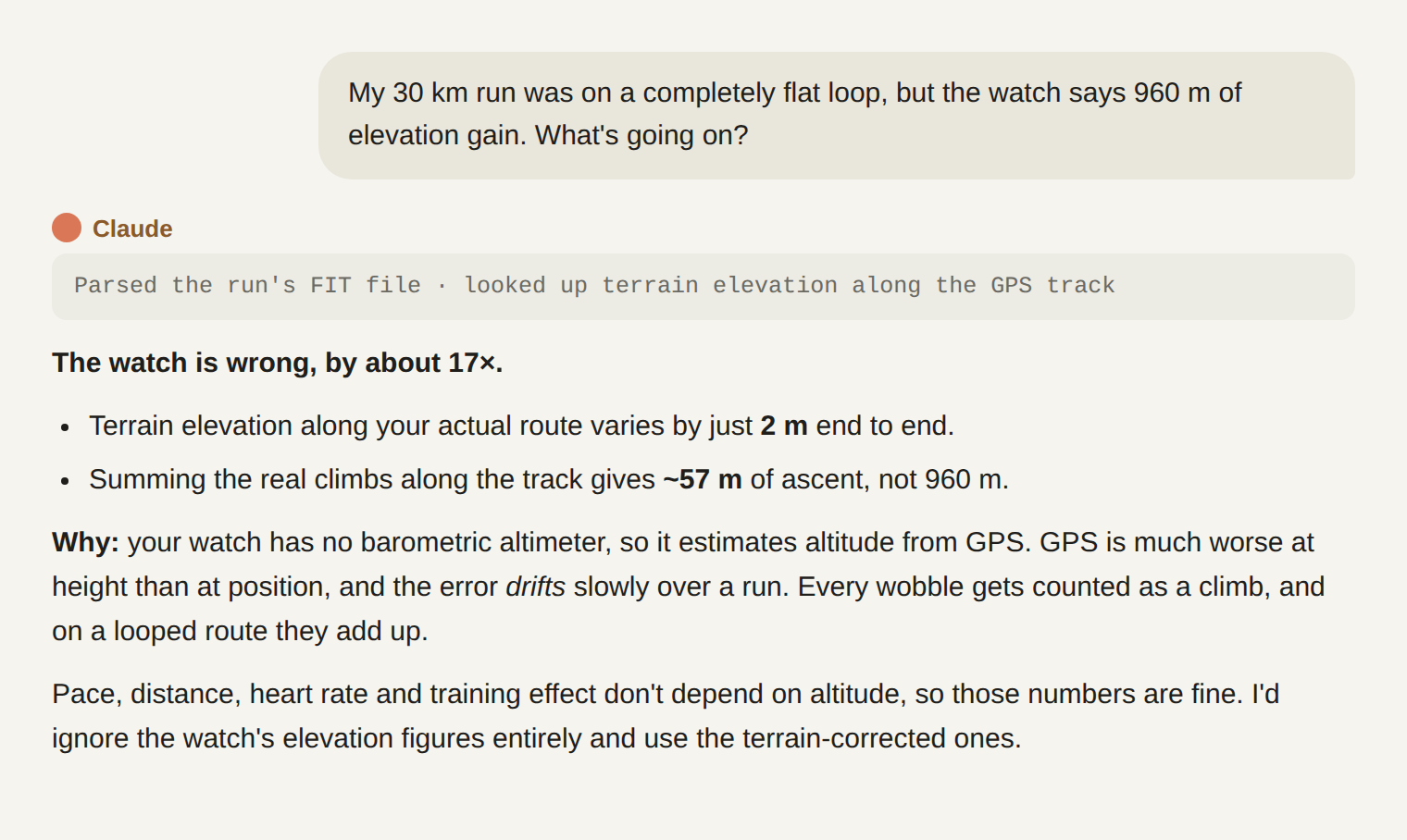
With the raw GPS track in the repo, Claude could check it against an elevation map of the terrain, the same thing Strava does for watches like mine. The real number was around 57 m, not 960. That check is now a script in the repo, and the corrected numbers sit right next to the watch’s own.
Bonus: why the watch was lying
My watch has no barometer. Watches that do have one measure height by air pressure, which drops by roughly 1 hPa for every 8 m you climb. That’s a small but very steady signal, so they pick up even a short rise.
Without one, the watch falls back to GPS for altitude, and GPS is much worse at height than at position. The satellites are all above you, never below, so there’s nothing to pin your height from underneath. Vertical error ends up a few times larger than horizontal, and it wanders slowly over a run. The watch treats every wobble as a climb, and on a 30 km loop the wobbles add up to a respectable hill.
Pace, distance and heart rate don’t depend on altitude, so those were fine all along. Just don’t believe the elevation figure on a watch without a barometer.
Caveats
It works smoothly in Claude Code, not so much in the regular Claude chat. The chat app can attach a GitHub repo, but it reads files as text. It can’t open a SQLite database or run a script against the data, and a project needs a manual “Sync now” to see fresh data. Claude Code, on the other hand, actually clones the repo and runs code against it, and it’s available from the phone too, so check 4 still holds.
None of this is Claude-specific. Anything that can connect to a GitHub repo and run code against it will work the same way: Codex, or whatever ships next month. That was a nice side effect of picking a boring, widely supported building block.
GitHub is still an intermediary. I’m not pretending otherwise. The trade I made was swapping a fitness company, whose business is my data, for a private repo on a code host, whose business isn’t. If that’s still too much, the same setup works with a self-hosted Git server, since GitSync speaks plain Git.
The repo will grow. The database is replaced wholesale on every sync, and Git keeps every version. Mine is ~20 MB today, so there’s plenty of headroom before GitHub’s file size limits start to matter. But it’s worth knowing it’s there.
The thing I keep coming back to is how little of this was new. An open-source watch app, an open-source Git app, a private repo, and an LLM that can run code. The hard part was mostly saying no to the options that almost fit.